





Game Description
FNF vs. Granny
1. Game Overview
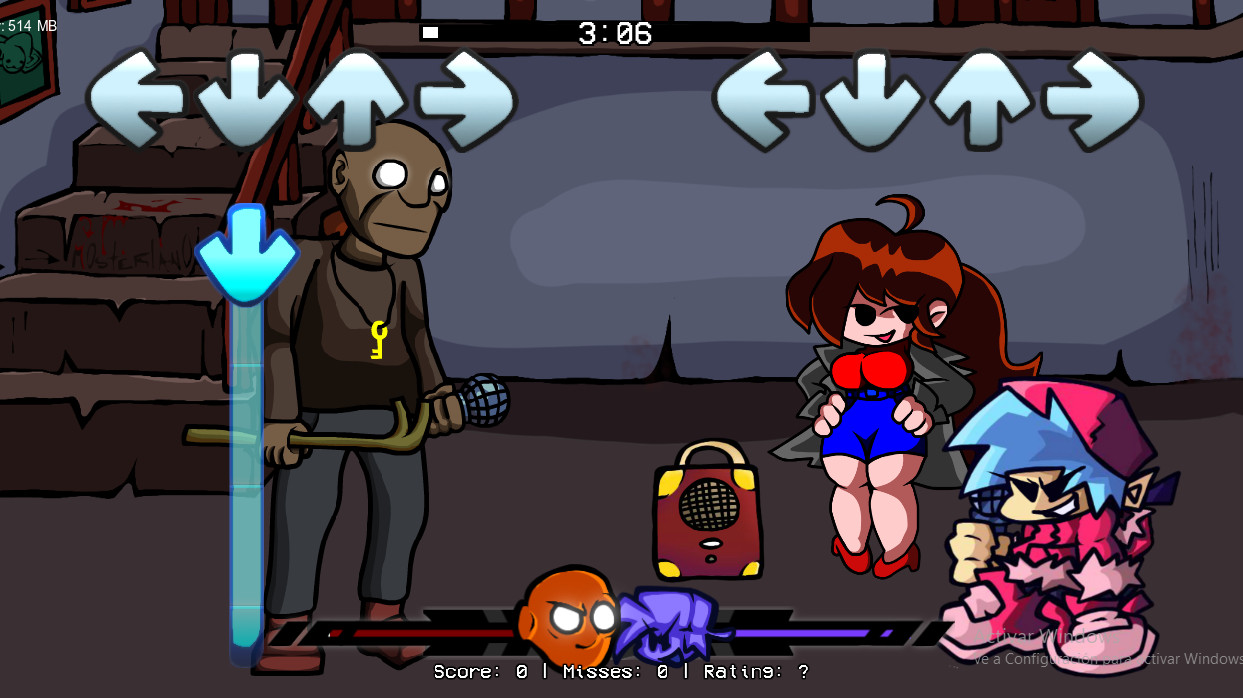
FNF vs. Granny is a Friday Night Funkin' mod that puts Boyfriend face-to-face with the most unlikely opponent on the site: the Granny from the horror escape game series. He walked into the wrong house. She's already waiting in the shadows of the broken-down hut, old furniture piled in the dark corners, the whole space wrong in the way that Granny's environments always are. But there's no running in FNF — there's only the microphone, the beat, and whether you can hit every arrow in the right window.
The mod centers on a single, full-length track rather than a multi-song week structure. This focused design means the entire encounter with Granny happens in one continuous performance — there's no warm-up round, no second track to make up for a poor first attempt. The health bar is the single arbiter of the whole battle: keep it pushed toward Boyfriend's side and he walks out of the hut intact; let it drift toward Granny's side and the duel is over.
The horror house setting distinguishes this mod visually from the usual Friday Night Funkin' street and stage backdrops. The rundown hut, the shadows closing in, and Granny's presence in the frame give the standard FNF visual language an atmospheric edge that horror-genre fans will recognize immediately. It's not a mechanic change — the arrow system works identically to any other FNF experience — but the context transforms a rhythm game into something that feels genuinely tense.
Available on both web browser and Android/iOS, FNF vs. Granny is accessible on any platform where Friday Night Funkin' mods run smoothly.
Key Details:
- Genre: Rhythm Game / Music Battle
- Difficulty Level: Medium — single-track format with no second chances
- Average Play Time: 5–10 minutes per attempt (length of the full track)
- Best For: Friday Night Funkin' fans aged 10+; players curious about the Granny character in a non-horror context; anyone who enjoys rhythm game combat with horror game aesthetics
2. How to Play
Getting Started:
- Press Enter to start and navigate menus — Enter handles game start, menu selections, and pausing. Use it to begin the track once the game has loaded.
- Watch the top of the screen — not the arrows mid-screen — Arrow symbols scroll upward from the bottom toward a target zone at the top. Keeping your eyes on the top target zone rather than following arrows from their origin point gives you more reaction time and better timing accuracy.
- Hit the matching arrow key at the moment arrows overlap the target — When a colored arrow symbol reaches the target zone at the top of the screen, press the matching directional key (WASD or arrow keys) at the moment of overlap. Clean overlaps register as successful notes.
- Keep the health bar pushed toward Boyfriend's side — The health bar between Boyfriend and Granny shifts with each hit or miss. Successfully hit notes push it toward Boyfriend; missed notes or wrong key presses push it toward Granny. Keeping it consistently in Boyfriend's half wins the battle.
- Stay locked in from first note to last — There are no extra rounds or checkpoint saves in FNF vs. Granny. The whole battle lives and dies in a single continuous performance.
Basic Controls:
| Action | Input |
|---|---|
| Start / select / pause | Enter |
| Hit notes (sing) | WASD or Arrow Keys |
| Back / exit | ← or Esc |
| Adjust volume | - / + |
Objective: Hit incoming arrow symbols at the correct moment as they reach the target zone at the top of the screen, maintaining the health bar in Boyfriend's favor throughout the full length of the track. Survive the complete single-song battle against Granny without letting the health bar fall fully into her control.
3. Game Features & Highlights
- ✓ Single-track mod structure — The entire Granny rap battle takes place in one full-length song — a focused, high-stakes format with no additional rounds or warmup tracks
- ✓ Horror house setting — The rundown, shadow-filled hut and Granny's in-frame presence give the standard FNF visual framework an atmospheric horror edge distinct from typical mod backdrops
- ✓ Single continuous health bar — Victory or defeat in the rap battle is determined by one health bar across the full track — no round resets or second battles following a poor opening
- ✓ Cross-platform play — browser and Android/iOS — Available on PC browsers and mobile devices, with the arrow key system adaptable to touchscreen input on mobile
- ✓ Volume-adjustable audio — The - and + keys allow in-game volume adjustment for players who find the track audio distracting their timing focus during tricky arrow sequences
4. Tips & Strategies
Beginner Tips:
- Warm up on another Friday Night Funkin' song before attempting FNF vs. Granny if the rhythm game format is unfamiliar or if it's been a while since your last FNF session. The single-track, no-retry structure means cold-starting into Granny's battle without calibrated timing reflexes is more costly here than in multi-track FNF experiences.
- Keep one hand stable on the arrow keys rather than lifting fingers between notes. A hand position that keeps all four fingers hovering near their respective keys — rather than lifting and repositioning after each press — enables significantly faster switching between notes during dense arrow sequences.
- Lower the volume slightly if the track's audio is pulling your attention toward listening rather than watching. Timing accuracy in FNF comes from visual synchronization with the arrow overlap, not from reacting to the music — if the audio is drawing your focus, reducing it keeps your attention on the screen target zone where it needs to be.
Advanced Strategies:
- Maintain a fixed eye position at the top target zone throughout the entire track rather than allowing your gaze to drop toward the mid-screen arrow scroll. This is the most consistently effective timing accuracy improvement in FNF — the arrows are already moving toward the zone, so watching the zone rather than following the arrows provides the same information with better timing precision.
- During the most arrow-dense passages of the track, prioritize missing fewer notes over hitting every one. A defensive approach — pressing only notes you're confident about and releasing ambiguous ones — typically produces a better health bar result than aggressive pressing that generates miss-penalties from incorrect inputs.
- If the health bar drifts into Granny's territory mid-track, don't accelerate your pressing speed in an attempt to recover quickly. Accuracy matters more than speed in FNF — the correct response to a slipping health bar is tightening your timing discipline on clean hits rather than pressing faster and generating additional misses.
What to Watch Out For:
- Eyes drifting from the top target zone — The most common timing error in FNF vs. Granny is watching arrows in the mid-screen scroll rather than maintaining focus on the top overlap zone. Every time your gaze drops below the target zone, your effective reaction time for the next overlap decreases. Return your eyes to the top zone immediately after any gaze drift.
- Treating missed notes as individual failures — In the single-track format, a missed note is not the end — the health bar can recover from individual misses with subsequent clean hits. Don't let a missed note break your rhythm focus on the following arrows; a clean recovery sequence after a miss is more valuable than dwelling on the miss itself.
5. Game Elements Explained
The Single-Track Battle Format FNF vs. Granny's mod structure — one full-length track rather than a multi-song week — creates a fundamentally different experience from standard FNF content. In multi-track weeks, an opening song provides calibration time: players adjust to the tempo, establish their timing rhythm, and build health bar margin before more complex songs arrive. FNF vs. Granny eliminates this calibration phase entirely. The Granny track is the only track — there's no easier opener to build confidence from, and there's no second opportunity if the health bar fails. This format demands that players arrive at the battle already calibrated: familiar with the FNF mechanic, comfortable with their key positioning, and ready to sustain accurate timing from the first arrow. For players who meet this requirement, the single-track format creates exceptional tension — every section of the song matters equally because there's no subsequent track to compensate for a poor stretch. The entire battle's outcome lives in a single, unbroken performance.
The Health Bar Outcome System The health bar in FNF vs. Granny is the sole arbiter of the battle's result — there are no additional metrics, no score thresholds, and no partial credits. It begins centered between Boyfriend and Granny, and each interaction with the track pushes it in one direction: correct, well-timed hits push it toward Boyfriend; misses and incorrect presses push it toward Granny. Maintaining the bar in Boyfriend's half throughout the full track length is the win condition; letting it fall completely into Granny's half ends the battle regardless of how far into the track you are. This binary, health-bar-only outcome system makes FNF vs. Granny's success condition exceptionally clear — there's no confusion about what constitutes winning or losing, and the health bar's visible position at all times provides constant, real-time feedback on performance. A health bar that's consistently deep in Boyfriend's territory indicates a comfortable performance; one hovering near center indicates a razor-close battle that could go either way in the final sections.
The Horror House Setting Within FNF Visual Language FNF vs. Granny's rundown hut backdrop is a deliberate departure from the typical Friday Night Funkin' aesthetic — the colorful streets, neon stages, and pop-culture environments that characterize most of the base game and its mods. The shadow-filled horror interior, the dilapidated furniture, and Granny's visual presence in the frame as the opposing rapper bring the horror game's atmospheric design language into the rhythm game context. This doesn't change the underlying mechanic — arrows still scroll, timing still determines outcomes — but it changes the emotional register of the experience. Players who know Granny from the escape games on this site bring additional context to the encounter: this is the same character they've been hiding from, now facing them across a microphone in a music battle instead of a darkened hallway. That context makes the single-track battle feel charged in a way that a mechanically identical battle against a different opponent would not.
6. Frequently Asked Questions
Q: How do I start the track? A: Press Enter to navigate the game's start screen and begin the rap battle. Enter also handles menu selections and pausing during play. Use the arrow keys or WASD to navigate menu options if a selection screen appears before the battle begins.
Q: What happens if I miss too many notes? A: Missed notes push the health bar toward Granny's side. If the health bar falls completely into Granny's control before the track ends, the battle is over and you'll need to restart. Individual misses are recoverable — a sequence of clean hits after a miss can restore the health bar to Boyfriend's side. The battle is lost only when the health bar fully depletes on Boyfriend's end, not from any individual missed note.
Q: Is there a way to practice before the full battle? A: FNF vs. Granny doesn't include a built-in practice mode for its single track. The recommended preparation approach from the game's own tips is to warm up on another Friday Night Funkin' song first to calibrate your timing reflexes before entering the Granny battle. This is particularly useful if you haven't played FNF recently or are unfamiliar with the arrow timing system.
Q: Is FNF vs. Granny playable on mobile? A: Yes — FNF vs. Granny is available on both web browser (PC) and Android/iOS mobile devices. The directional input system adapts to touchscreen controls on mobile. Note that timing accuracy on touchscreen may differ from keyboard input — allow a session or two to calibrate your mobile timing before expecting the same performance as desktop play.
Q: Can I adjust the volume during the battle? A: Yes — use the - key to lower volume and the + key to raise it during gameplay. This can be done mid-track without interrupting the battle. The game's own tips suggest slightly lowering volume if the track audio is drawing your attention away from the visual arrow timing — keeping your focus on the screen target zone rather than listening to the music improves timing accuracy for most players.
7. Related Games You Might Enjoy
If you like FNF vs Granny, you might also enjoy:
- Five Nights at Freddy's - It offers another browser horror run with related survival, puzzle, or escape pressure.
- Five Nights at Freddy's 2 - It offers another browser horror run with related survival, puzzle, or escape pressure.
- Five Nights at Freddy's 3 - It offers another browser horror run with related survival, puzzle, or escape pressure.
Comments (0)
Add a Comment