






Live Granny4.io

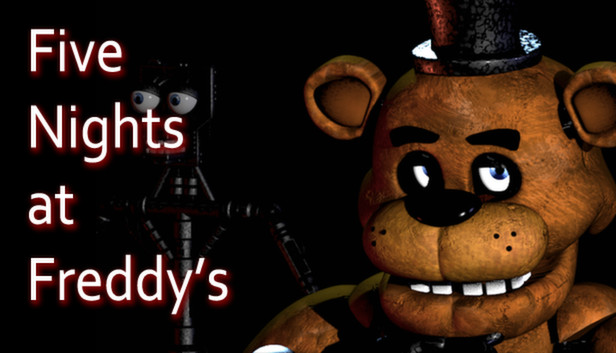
Five Nights at Freddy's

Browser Instant Play Free
advertisement

Game Description

Five Nights at Freddy's


1. Game Overview

Five Nights at Freddy's is the horror game that redefined what browser-based survival could feel like. You are Mike Schmidt, newly hired as the overnight security guard at Freddy Fazbear's Pizza — a children's entertainment restaurant staffed by four animatronic characters: Freddy Fazbear, Bonnie, Chica, and Foxy. Your shift runs from midnight to 6:00 AM. Five nights. That's all you have to survive.

The premise sounds manageable. Watch the cameras, stay in your office, make it to morning. What the game's cheerful exterior conceals is deeply unsettling: the animatronics move at night. No one knows why. The restaurant's previous security guard left no explanation. The Phone Guy, who calls you on your first night, is helpful — but also clearly frightened. And the animatronics, should they reach your office and find you there, will not treat you kindly.

FNAF's genius is its resource management layer. Your office has two doors with control panels and a camera system covering the entire restaurant. Each action — checking cameras, triggering lights, closing doors — consumes power from a shared pool that must last the entire 6-hour shift. Run out of power and the doors stop working. The animatronics know it too.

The game builds dread methodically and brilliantly. Freddy watches from the darkness of the show stage. Bonnie appears in the hallway outside your left door. Chica lingers near your right. Foxy, fast and aggressive, charges from Pirate Cove when you've neglected to watch him. Every hour that passes in-game is a small victory. Making it to 6:00 AM feels like genuinely surviving something.

Key Details:

  • Genre: Survival Horror / Resource Management
  • Difficulty Level: Medium (Night 1–3) to Hard (Night 4–5)
  • Average Play Time: 10–20 minutes per night; 60–100 minutes for a full five-night run
  • Best For: Horror fans aged 13+, fans of atmospheric tension and strategy, players who enjoy resource management under pressure

2. How to Play

Getting Started:

  1. Read the Phone Guy's message on Night 1 — Click Help at the start of the game to hear the Phone Guy's recorded message. It contains real, practical survival information that applies across all five nights. Do not skip it.
  2. Learn the animatronics' starting positions — Each character begins in a fixed location (Freddy, Bonnie, and Chica on the show stage; Foxy behind the Pirate Cove curtain). Knowing where they start helps you understand when and how they're moving.
  3. Check cameras in a rotation — Cycle through camera feeds to track each animatronic's position. When they move closer to your office, you need to know before they arrive.
  4. Close doors when threats are adjacent — When you see an animatronic in the hallway immediately outside your left or right door, close that door using the panel button. Keep it closed until the animatronic moves away — then open it to conserve power.
  5. Monitor your power — Every system draws power. Cameras, lights, and closed doors all consume electricity from the same limited pool. Keep doors open whenever possible and use lights only to check for immediate threats.

Basic Controls:

ActionInput
Interact / ClickLeft Mouse Button
Switch camera feedsLeft Click on camera map
Toggle door / light panelsLeft Click on panel buttons

Objective: Survive from midnight (12:00 AM) to 6:00 AM for five consecutive nights as the overnight security guard at Freddy Fazbear's Pizza. Monitor security cameras to track four animatronic characters, manage your office's door and light systems, and survive each night without running out of power or allowing an animatronic to reach you.


3. Game Features & Highlights

  • Four distinct animatronic characters — Freddy, Bonnie, Chica, and Foxy each move and behave differently, requiring individualized tracking and response strategies rather than a single one-size-fits-all approach
  • Power management resource system — A shared power pool depleted by every active system creates constant tension between staying informed (cameras, lights) and staying protected (closed doors)
  • Full restaurant camera network — Monitor every room of Freddy Fazbear's Pizza through a multi-feed surveillance system, tracking animatronic movement and anticipating threats before they reach your office
  • Escalating five-night difficulty — Each night increases animatronic aggression and movement speed, with Night 5 representing a significantly more intense version of the game than Night 1
  • Atmospheric audio design — The game's sound design is a critical survival tool: animatronic movement sounds, door knockings, and Foxy's running charge can all be heard and used to assess threats without checking cameras

4. Tips & Strategies

Beginner Tips:

  • Keep both doors open by default and close them only when an animatronic is in the immediately adjacent hallway. Leaving doors closed "just in case" drains power dangerously fast.
  • Check the Pirate Cove camera regularly. Foxy charges when you've ignored him too long — watching him periodically resets his aggression. Unlike the other animatronics, neglecting to observe Foxy is what enables his attack.
  • Play with headphones. Animatronics make distinctive sounds as they move through the restaurant — Bonnie and Chica create audio cues when they're near your doors that tell you to close up without needing to use a camera check.

Advanced Strategies:

  • On higher nights, minimize camera time per check. You need enough information to know if a door needs closing — you don't need to confirm every animatronic's position every check. Targeted, efficient camera use preserves more power than thorough scanning.
  • Learn Freddy's behavior separately from the others. Freddy typically moves only when the cameras are down and advances slowly — but on Night 5, he becomes the primary threat. Monitoring the camera directly above his show stage position is the most efficient way to track him.
  • Develop a power budget for each in-game hour. If you're consuming more than roughly 10% per hour on early nights, your door and light usage is too frequent. Adjust your habits before the later hours when animatronics are more active and require more responses.

What to Watch Out For:

  • Leaving doors closed too long — A closed door blocks animatronics but drains power continuously. The moment you confirm the hallway is clear, open the door. Caution costs power that you'll need later.
  • Ignoring Pirate Cove — Foxy's attack is one of the most disorienting in the game because it comes from a direction many new players don't watch closely. Check Pirate Cove regularly from Night 1 onward to establish the habit before it becomes critical.

5. Game Elements Explained

The Power Management System Power management is the central strategic layer of Five Nights at Freddy's and what separates it from a simple observation game. Your office begins each night with a full power supply that must last from midnight to 6:00 AM. Every active system draws from this pool: the camera feed, the left and right door lights, and the left and right doors themselves. The drain rate increases with each additional active system — running cameras, both lights, and both doors simultaneously accelerates power consumption dramatically. The game never lets you forget this: a power percentage counter and usage rate are permanently visible in your office. Every decision is colored by power awareness: is this camera check worth the drain? Can I afford to keep this door closed for another 30 seconds? Do I need the light, or can I close the door on instinct? Running out of power before 6:00 AM disables all systems simultaneously — and Freddy appears shortly after to end the night.

The Animatronic Behavior System Each of the four animatronics operates on a distinct behavioral pattern that requires individualized management. Freddy Fazbear moves slowly and tends to advance primarily when the cameras are not actively viewing him — making camera awareness directly tied to his aggression. Bonnie and Chica approach through the left and right hallways respectively, appearing first on hallway cameras before reaching the doors. Both can be managed by tracking their camera positions and closing the relevant door when they appear in the immediately adjacent space. Foxy is behaviorally different from the others: he charges from Pirate Cove down the left hallway when players have not monitored his camera position for too long. Regular brief checks of Pirate Cove reset his aggression meter. On higher nights, all four characters become faster and more persistent, and Freddy in particular becomes a significantly more active primary threat.

The Five-Night Difficulty Escalation Five Nights at Freddy's structures its campaign across five nights of increasing difficulty, with each night adjusting the animatronics' aggression and activity levels. Night 1 is deliberately forgiving — a learning environment designed to introduce the game's mechanics without punishing inexperience too harshly. Nights 2 and 3 represent the core challenge that the game's mechanics are designed around: balanced difficulty that rewards developing efficient camera and power habits. Nights 4 and 5 are significantly more demanding, with animatronics moving more frequently, requiring faster responses and tighter power management. Night 5 in particular is designed to test everything the player has learned across the previous four nights simultaneously. For players completing the game for the first time, experiencing Night 1 through 3 as a skill-building progression — rather than treating each night as a fresh start — produces the fastest overall improvement.


6. Frequently Asked Questions

Q: How do I know when to close my office doors? A: Check the hallway cameras immediately adjacent to your office (the left and right hall cameras). When you see an animatronic in the hallway directly outside your door, close that door immediately using the panel button. You can also use the hallway lights — toggle them on briefly to check whether an animatronic is standing in the doorway. If the light reveals a silhouette, close the door.

Q: What should I do if my power runs out before 6:00 AM? A: If your power reaches zero, all office systems shut down. The room goes dark and the familiar music box begins playing. Freddy will appear in your doorway shortly after. At this point, there is nothing you can actively do — the night is effectively over. For prevention: keep doors open whenever possible, minimize camera time per check, and never run both door lights simultaneously.

Q: Is Five Nights at Freddy's playable in any browser? A: Yes. Five Nights at Freddy's on granny4.io runs directly in your web browser with no downloads or installations required. It is compatible with Chrome, Firefox, Safari, and Edge on desktop computers. No plugins or additional software are needed.

Q: Can I save my progress between nights? A: Progress between completed nights is saved during your browser session. Successfully completing a night advances you to the next. If you close the browser tab mid-night, you may need to replay the current night from the beginning. Completing and surviving a full night before exiting is the most reliable way to preserve progress.

Q: How do I unlock the Phone Guy's message? A: At the start of each night, click the Help option that appears in the game interface. This plays the recorded phone message from the Phone Guy for that night. Night 1's message contains the most foundational gameplay instructions and should be listened to in full before your first attempt.

7. Related Games You Might Enjoy

If you like Five Nights at Freddy's, you might also enjoy:

  • Five Nights at Freddy's 2 - It expands the same office-survival formula with faster reactions and more threats.
  • Granny 4 - It uses camera feeds and defensive timing in a more mobile Granny-style setting.
  • I'm on Observation Duty - It also makes watching screens carefully the difference between safety and failure.