





Live Granny4.io

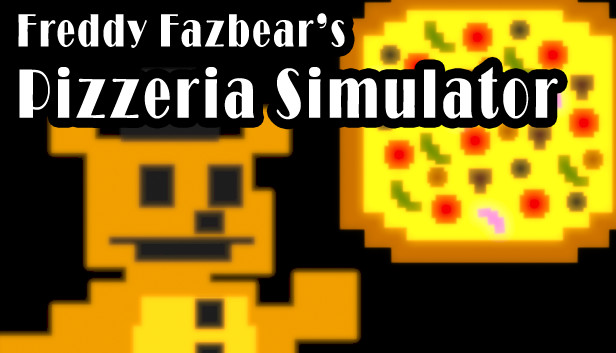
Freddy Fazbear's Pizzeria Simulator

Browser Instant Play Free
advertisement

Game Description

Freddy Fazbear's Pizzeria Simulator


1. Game Overview

Freddy Fazbear's Pizzeria Simulator presents itself as something entirely unexpected for the FNAF franchise: a cheerful, lighthearted pizza restaurant management game. You are in charge of Freddy Fazbear's pizza operation — designing the menu, serving customers, collecting points, and running what looks on the surface like a perfectly ordinary children's restaurant simulator.

It is not a perfectly ordinary children's restaurant simulator.

Pizzeria Simulator is a game of deliberate misdirection. The bright colors, upbeat music, and point-scoring pizza mechanics are a facade layered over something much darker — a FNAF experience that rewards players who look past the surface presentation and engage with what the game is actually doing. As a standalone game experience, the pizza management gameplay is genuinely enjoyable and mechanically distinct from anything else in the franchise. As a FNAF entry, it is one of the series' most narratively ambitious chapters.

The core gameplay loop — navigating the kitchen, throwing pizzas to serve customers, managing your point score — is accessible and immediate. Controls are simple: arrow keys to move, Spacebar to throw pizza, mouse to interact. The scoring system is clear and responsive. It is, by design, easy to pick up and enjoy without any prior FNAF knowledge.

For players who know what the FNAF series is capable of, Pizzeria Simulator is a different kind of experience: one that uses the comfort of familiar genre trappings to create something genuinely surprising. Play it as a pizza game. See where it takes you.

Key Details:

  • Genre: Casual Arcade / Management Simulation (with horror elements)
  • Difficulty Level: Easy–Medium
  • Average Play Time: 10–20 minutes per session
  • Best For: Casual players and FNAF fans aged 10+; players who enjoy score-chasing arcade gameplay; anyone curious about the franchise's more experimental entries

2. How to Play

Getting Started:

  1. Take control of your pizza character — You control a robot worker inside Freddy Fazbear's kitchen. Use the arrow keys to move through the restaurant space and position yourself to serve customers.
  2. Serve kids to earn points — Each time you successfully deliver a pizza to a waiting child customer, you earn points. The more customers you serve efficiently, the higher your score climbs.
  3. Use Spacebar to throw pizza — Position yourself and press Spacebar to throw pizzas toward your target. Timing and positioning affect accuracy — get close enough to hit your mark reliably.
  4. Interact with the environment using the mouse — Certain elements of the restaurant environment are interactive via mouse click. Explore what's clickable and engage with the restaurant's systems as they become available.
  5. Chase your high score — Pizzeria Simulator rewards efficient, accurate service. Focus on maximizing successful deliveries in the shortest time to push your point total as high as possible.

Basic Controls:

ActionInput
MoveArrow Keys
Throw pizzaSpacebar
InteractMouse / Left Click
Toggle soundSound button on game screen
Full screen modeFull screen button on game screen

Objective: Operate Freddy Fazbear's pizza restaurant by moving through the kitchen and dining area, serving pizza to child customers using the throw mechanic, and accumulating as many points as possible. Successfully serving each customer increases your score — maximize your efficiency to reach the highest score you can.


3. Game Features & Highlights

  • Accessible arcade gameplay — Simple three-input control scheme (arrow keys, Spacebar, mouse) makes Pizzeria Simulator immediately playable without any learning curve or prior FNAF experience required
  • Score-chasing point system — Every successful pizza delivery earns points, with a clear and responsive scoring display that makes high-score attempts engaging and replayable
  • Restaurant management theme — A refreshing tonal departure from the horror-focused FNAF formula, presenting the franchise's setting through the lens of an upbeat pizza service simulation
  • Adjustable audio and display settings — Toggle game sound on or off and switch between windowed and full screen mode directly from the game screen for a customized play experience
  • Browser-native HTML5 gameplay — Runs instantly in any modern desktop browser with no downloads, plugins, or installations required — click and play within seconds

4. Tips & Strategies

Beginner Tips:

  • Position yourself close to customers before throwing. Pizza throws are more accurate at short range, and closer positioning reduces the chance of a miss that costs you time and points.
  • Develop a movement pattern that flows between the kitchen and the customer area efficiently. Spending time backtracking or navigating around obstacles cuts into your delivery rate and ultimately your score.
  • Toggle the game to full screen mode using the in-game button for a larger, clearer view of the restaurant layout. A bigger screen makes it easier to track customer positions and plan your movement route.

Advanced Strategies:

  • Prioritize customers who have been waiting longest. In restaurant service games, efficient queue management tends to yield better scores than serving customers in random order — longer-waiting customers who leave before being served may penalize your score or reduce your point multiplier.
  • Develop a throwing rhythm rather than aiming each throw independently. Consistent timing and positioning make the throw mechanic more reliable under pressure than treating each delivery as a new aiming challenge.
  • Use the sound toggle strategically — audio cues in the game can provide useful context about restaurant activity and customer states. Playing with sound on during your first sessions gives you a fuller picture of the game's feedback systems.

What to Watch Out For:

  • Rushing throws from long range — Spacebar pizza throws from too far away frequently miss, wasting time that could be spent serving additional customers. Close-range positioning before throwing is consistently more efficient than attempting distance throws.
  • Ignoring interactive elements — The mouse interaction mechanic exists for a reason. Overlooking clickable elements in the restaurant environment means missing parts of the game that may be relevant to your score or your overall experience of what Pizzeria Simulator is doing.

5. Game Elements Explained

The Pizza Service Mechanic The core gameplay loop of Freddy Fazbear's Pizzeria Simulator centers on the pizza delivery mechanic — a combination of movement and throwing that forms the backbone of every scoring opportunity in the game. Your robot character moves through the restaurant using the arrow keys, and the Spacebar launches a pizza throw in the direction you're facing. The mechanic is simple in principle and rewarding to optimize in practice. Effective pizza service requires developing spatial awareness of the restaurant layout, anticipating where the next customer will appear, and positioning your character to minimize travel time between deliveries. The throwing mechanic rewards consistent positioning over improvised aiming — players who develop a reliable pre-throw routine consistently outperform those who approach each delivery differently. The score system responds directly to delivery efficiency: faster deliveries, higher accuracy, and more customers served in a session all contribute to a higher final point total.

The Scoring System Points in Freddy Fazbear's Pizzeria Simulator are earned through successful pizza deliveries to child customers. The scoring system is transparent and immediate — successful deliveries register and update your point total in real time, giving you constant feedback on your performance. This makes the game naturally suited to score-chasing play: each session has a clear numerical outcome, which creates an obvious target for improvement across replays. The scoring system rewards both accuracy and speed — missing throws and slow delivery routes both reduce the number of successful servings within a session. Players focused on high scores should optimize for delivery rate (how many customers served per minute) rather than individual throw success, since the fastest path to a high point total is maximizing the number of completed deliveries rather than perfecting each individual action.

The Restaurant Environment The Freddy Fazbear's Pizzeria Simulator restaurant is a navigable space with multiple interactive elements accessible via mouse click. The layout creates a natural movement flow between the kitchen and the customer dining area, with your route efficiency directly affecting your delivery speed and therefore your score. Beyond the core pizza service loop, the environment contains clickable interactive elements that represent an additional layer of engagement with the restaurant's systems. The game's full screen mode — togglable from the in-game screen controls — expands the visible play area and makes navigating the environment more comfortable, particularly for players who want a clearer view of customer positions across the dining area. The sound toggle allows audio to be adjusted without leaving the game, making the experience customizable for different play contexts and preferences.


6. Frequently Asked Questions

Q: How do I throw pizza to customers? A: Move your character close to the customer you want to serve using the arrow keys. Once positioned, press Spacebar to throw the pizza. The throw travels in the direction your character is currently facing. Close-range positioning before throwing significantly improves accuracy compared to longer-range attempts.

Q: What should I do if I keep missing throws and losing points? A: Focus on positioning rather than throw timing. Get as close to the target customer as possible before pressing Spacebar, and make sure your character is facing directly toward them. Developing a consistent pre-throw routine — move to close range, orient toward the target, throw — tends to produce better accuracy than adjusting your approach on the fly each time.

Q: Is Freddy Fazbear's Pizzeria Simulator related to the main FNAF story? A: Yes. Despite its casual pizza management presentation, Pizzeria Simulator is a full entry in the Five Nights at Freddy's franchise with connections to the series' broader narrative. Players familiar with the FNAF series will find context and story elements embedded in the game beyond its surface-level arcade gameplay. First-time players can enjoy the game entirely on its arcade merits without prior franchise knowledge.

Q: Can I save my high score between sessions? A: Your score is tracked during your active play session. For the best high-score tracking experience, complete full sessions in one browser sitting. The game is well-suited to repeated short sessions aimed at improving on your previous best score.

Q: Is Freddy Fazbear's Pizzeria Simulator available on mobile? A: Pizzeria Simulator on granny4.io runs in desktop web browsers and is designed for keyboard-and-mouse play. The arrow key and Spacebar control scheme is not well-suited to touchscreen input. Desktop play on Chrome, Firefox, Safari, or Edge provides the optimal experience.

7. Related Games You Might Enjoy

If you like Freddy Fazbear's Pizzeria Simulator, you might also enjoy: