


Game Description
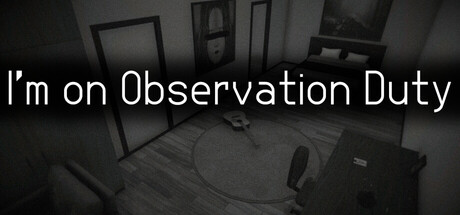
I'm on Observation Duty
1. Game Overview
I'm on Observation Duty is a horror game that does something genuinely unusual: it makes looking the terrifying act. You are the overnight security supervisor of a mysterious apartment building. Your tools are a bank of surveillance cameras and a reporting interface. Your job is to watch, remember, and report — before things get out of hand.
The apartment looks normal at first. Furniture in expected places, rooms appropriately lit, nothing visibly wrong. But the building is changing. Objects shift. Items disappear. New things appear that weren't there before. The changes are subtle — a chair moved two feet to the left, a picture frame gone from a wall, a door now open that was closed — and they happen when you're looking at a different camera. Your job is to catch them.
What makes I'm on Observation Duty so effective as a horror experience is the absence of anything conventionally scary. There are no monsters visible on screen, no sudden attacks, no chasing. Just the growing, creeping certainty that something is deeply wrong in this building, and that whatever is causing these changes is getting bolder. Miss more than three anomalies and the game ends — not with a dramatic confrontation, but with the implication that you've already lost. The horror is in what you don't see in time.
Surviving until 6:00 AM requires the kind of sustained, methodical attention that games rarely demand. Every camera feed must be memorized. Every detail must be held in mind simultaneously. If that sounds exhausting, it is — and that exhaustion is precisely what makes the experience so immersive.
Key Details:
- Genre: Horror / Observation Puzzle
- Difficulty Level: Medium — scales sharply with the speed and subtlety of anomalies
- Average Play Time: 15–25 minutes per session (one full night)
- Best For: Horror fans aged 13+, players who enjoy detail-oriented puzzle games, fans of atmospheric tension over action-based gameplay
2. How to Play
Getting Started:
- Study every camera feed at the start — Before any anomalies begin, cycle through all camera views and memorize the baseline state of each room: what furniture is present, where it's positioned, what's on the walls, what doors are open or closed.
- Establish a camera rotation — Don't focus on one feed too long. Develop a consistent pattern for cycling through all cameras so each room is checked at regular intervals. The longer a room goes unwatched, the more time anomalies have to develop undetected.
- Report anomalies immediately — The moment you notice something wrong, open the Anomaly Report interface, select the affected room, and categorize the event type. Speed matters — unresolved anomalies accumulate toward your three-miss limit.
- Stay methodical, not reactive — Panic-scanning cameras randomly is less effective than a disciplined rotation. Stick to your cycle even when tension is high.
- Survive until 6:00 AM — Keep your anomaly count below the three-miss threshold through the full night and you survive. Miss three, and it ends.
Basic Controls:
| Action | Input |
|---|---|
| Navigate camera feeds | Mouse |
| Interact with environment / interface | Left Click |
| Open Anomaly Report | Click designated interface button |
| Select room and anomaly type | Mouse / Left Click |
Objective: Monitor the apartment's security camera feeds from the start of your shift until 6:00 AM, detecting and reporting environmental anomalies before they accumulate past the three-miss limit. Memorize the baseline state of every room and identify deviations — no matter how subtle — as quickly as possible.
3. Game Features & Highlights
- ✓ Unique observation-based horror mechanic — Fear is generated entirely through environmental change and the anxiety of potential missed details — no monsters, no jump scares, pure psychological tension
- ✓ Multi-room camera surveillance system — Monitor an apartment across multiple simultaneous camera feeds, creating the constant pressure of deciding where to look when you can only watch one feed at a time
- ✓ Anomaly Report interface — A structured reporting system requiring you to identify both the affected room and the type of anomaly — categorization under pressure adds a cognitive layer beyond simple spotting
- ✓ Three-anomaly miss limit — A strict, unforgiving threshold that makes every overlooked detail potentially game-ending, maintaining high tension from the first minute to 6:00 AM
- ✓ Escalating anomaly frequency and subtlety — Anomalies begin relatively noticeable and become progressively harder to detect as the night advances, reflecting an escalating supernatural presence
4. Tips & Strategies
Beginner Tips:
- Before the shift starts, take an extended look at each room and mentally note three or four specific details per feed: the position of a chair, what's on a table, whether a door is open. Concrete details are easier to verify quickly than general impressions.
- Develop a fixed camera rotation and stick to it. Cycling through feeds in a random order creates blind spots. A consistent sequence ensures every room receives equal surveillance time.
- When you spot an anomaly, report it immediately rather than continuing to scan. An unreported anomaly is already counting against your limit — resolve it first, then continue your rotation.
Advanced Strategies:
- Prioritize rooms that have shown anomalies previously in the session. Rooms that change once tend to change again — weighting your attention toward active rooms improves your overall detection rate without neglecting others.
- Categorizing anomalies correctly in the Report interface requires knowing the event type vocabulary. Familiarize yourself with the available categories during your first run so that reporting in later runs is faster and more automatic.
- As the night progresses and anomaly frequency increases, tighten your camera rotation intervals. Early in the shift, a slower cycle with more attention per feed is effective. Later, faster cycles with quicker assessments per feed become necessary to keep up.
What to Watch Out For:
- Focusing too long on one feed — The longer you stay on a single camera, the more other rooms accumulate undetected changes. Discipline your attention; no single room is worth ignoring the rest.
- Reporting the wrong room — In the tension of a shift, it's easy to misidentify which room an anomaly occurred in, especially for rooms with similar layouts. Double-check the room label on the camera feed before submitting your report.
5. Game Elements Explained
The Anomaly Detection System The core mechanic of I'm on Observation Duty is the detection of environmental anomalies — changes to the baseline state of rooms that occur between your camera checks. These anomalies range from obvious (a large piece of furniture disappeared entirely) to extremely subtle (a picture frame slightly repositioned, a light source that is now off). The game's difficulty rests almost entirely on this spectrum: early in the night, anomalies tend toward the detectable end; as 6:00 AM approaches, they become smaller, faster to reset, and more likely to occur in rooms you've just checked. The detection challenge is compounded by the fact that you cannot watch all rooms simultaneously — every second you spend on one feed is a second of unmonitored time for every other room. Effective anomaly detection is therefore as much about attention management as it is about visual acuity.
The Anomaly Report Interface When you identify an anomaly, you must report it through the game's structured Anomaly Report interface before it counts against your miss limit. This interface requires two pieces of information: the room where the anomaly occurred, and the type of anomaly you observed. This categorization step is more demanding than it initially appears. Under time pressure, with multiple feeds to monitor and the constant anxiety of potential misses accumulating, correctly identifying and categorizing an anomaly quickly requires both knowledge of the category vocabulary and confidence in your room identification. Practicing fast, accurate reporting is as important as sharpening your anomaly-spotting skills — a perfectly spotted anomaly that gets miscategorized still fails to resolve. On early runs, take the time to familiarize yourself with the interface's structure; on subsequent runs, reporting becomes faster and more instinctive.
The Three-Miss Limit I'm on Observation Duty's three-miss limit is its most psychologically effective design element. Three seems like a reasonable buffer — until you realize how quickly subtle anomalies can slip past a distracted or overwhelmed observer. The limit creates a constant, low-grade dread that persists from the first minute of the shift to the last: every camera check carries the implicit possibility that you've already missed something. This is intentional. The horror of the game is not in what happens to you when you fail — it's in the possibility that you might have already failed without knowing it. Did that room look exactly the same as before? Were you sure? The three-miss limit keeps that uncertainty alive throughout every session, and it's what makes surviving until 6:00 AM feel genuinely earned rather than statistically inevitable.
6. Frequently Asked Questions
Q: How do I report an anomaly correctly? A: When you notice a change in a room, click the Anomaly Report button to open the interface. Select the room where the anomaly occurred from the room list, then select the event type that best describes what changed — object moved, object missing, new object appeared, lighting change, and so on. Submit the report promptly. An anomaly that isn't reported counts toward your three-miss limit even if you spotted it.
Q: What should I do if I think I missed an anomaly but I'm not sure? A: If you're uncertain whether something changed in a room, make a quick mental note of what you think you remember and continue your rotation. If the same room shows additional changes on your next check, report all visible anomalies in that room. Unfortunately, the game does not tell you in real time whether you've missed something — you'll only know your miss count from the interface. When in doubt, report rather than wait.
Q: Is I'm on Observation Duty compatible with mobile devices? A: I'm on Observation Duty is designed for browser play and uses mouse-based controls throughout. The game is best experienced on a desktop or laptop computer — the detail-spotting requirements are significantly easier to meet on a larger screen. Mobile play may be technically possible but is not recommended given the visual precision required.
Q: Can I pause the game mid-shift? A: Pausing mechanics vary by browser session. The game is designed as a real-time observation experience, so pausing may not be available during active camera monitoring. Plan to complete a full night shift (through 6:00 AM) in a single uninterrupted session for the most reliable experience.
Q: Does the game get harder as the night progresses? A: Yes, noticeably. Anomalies become more frequent and more subtle as the shift advances toward 6:00 AM. The early hours of the night allow time to develop a camera rotation and establish room baselines; the later hours demand faster recognition and quicker reporting. Players who tighten their camera cycle and reduce per-feed dwell time as the night progresses tend to perform significantly better in the final hours.
7. Related Games You Might Enjoy
If you like I'm on Observation Duty, you might also enjoy:
- Exit 8 - It shares the anomaly-spotting structure and rewards patience over rushing.
- Five Nights at Freddy's - It uses camera-based observation as the heart of its horror loop.
- the Backrooms - It offers another slow-burn horror experience built around noticing what feels wrong.
Comments (0)
Add a Comment