
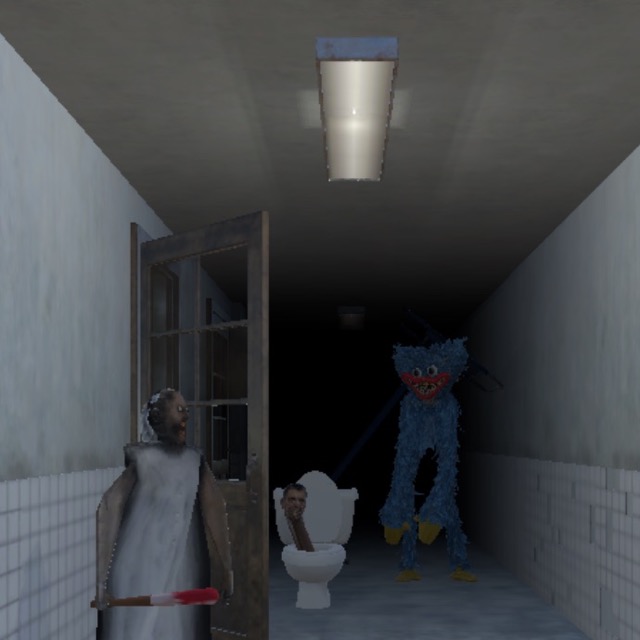




Granny: FNAF Hospital
2. How to Play Granny Fnaf Hospital
Getting Started
Getting Started:
- Learn the hospital layout immediately — Before the creatures start moving, cycle through all camera feeds and note which room each creature starts in. Understanding the building's camera coverage is essential before the night's activity begins.
- Check cameras in a consistent rotation — Don't fixate on one feed. Cycle through all available cameras at a regular pace so you always have a current read on where all three creatures are located relative to your guard station.
- Close the door when a creature is in the adjacent hallway — When a camera shows Granny, Huggy Wuggy, or the Skibidi Toilet moving into the hallway directly connected to your station, close that door immediately using your mouse controls.
- Use lights to confirm your immediate area — Flick on the lights near your station to check whether a creature has reached your immediate doorway before it triggers an encounter. If the light confirms the hall is clear, the coast is safe.
- Reopen doors promptly when threats pass — Closed doors are your defense, but they consume resources when held shut. Once a camera confirms a creature has moved away from your door, reopen it to preserve your available response capacity for the next threat.
Basic Controls:
| Action | Input |
|---|---|
| All actions (camera navigation, door locks, lights) | Mouse / Left Click |
Objective: Survive from the start of your night shift until sunrise across multiple nights at Granny: FNAF Hospital. Monitor a network of security cameras to track the movements of three roaming creatures — Granny, Huggy Wuggy, and the Skibidi Toilet — closing doors and activating lights to prevent them from reaching your guard station. Manage your door and light usage to avoid exhausting your available resources before morning.
1. Granny Fnaf Hospital Game Overview
Granny: FNAF Hospital is a browser-based survival horror game that takes the most recognizable mechanic in the FNAF genre — camera surveillance, door locks, and a dwindling resource — and populates it with three of the most recognizable monsters in online horror gaming. As the newly hired night guard at a hospital that operates normally during the day and becomes completely unhinged after dark, your job is simple in concept and nerve-wracking in practice: survive until sunrise.
The three patients — Granny, Huggy Wuggy, and the Skibidi Toilet — stay in their designated rooms during daylight hours. The moment the lights go out, they leave. All three of them. All at once. And all of them are heading for your guard station.
What makes Granny: FNAF Hospital work as a horror experience is the familiar tension of multi-threat camera management pushed through three characters with distinct movement styles. Granny is methodical and noise-aware. Huggy Wuggy is faster and more aggressive. The Skibidi Toilet is unpredictable in a way that keeps even experienced players guessing. Tracking all three simultaneously through a multi-room camera network while managing your door locks and lights — and not burning through your resources before sunrise — is the game's central challenge.
The controls are entirely mouse-based, making it one of the most accessible games on the site. But accessibility doesn't mean easy: the hospital gets more dangerous with each passing night, and the creatures grow less predictable as the hours tick by.
Key Details:
- Genre: Survival Horror / Camera Surveillance
- Difficulty Level: Medium (early nights) to Hard (later nights)
- Average Play Time: 10–20 minutes per night
- Best For: FNAF genre fans aged 12+; players who enjoy multi-threat camera management; fans of crossover horror featuring Granny, Huggy Wuggy, and Skibidi Toilet
3. Granny Fnaf Hospital Features & Highlights
- ✓ Three distinct horror creatures — Granny, Huggy Wuggy, and the Skibidi Toilet each move and behave differently, requiring individualized tracking and response strategies rather than a single one-size-fits-all approach
- ✓ Multi-camera hospital surveillance system — Monitor multiple rooms and hallways through a connected camera network, cycling between feeds to maintain current positional awareness of all three threats simultaneously
- ✓ Manual door and light controls — Active, mouse-operated door locks and proximity lights give you direct environmental control over your guard station's defenses
- ✓ Escalating nightly difficulty — Creature behavior becomes less predictable and more aggressive with each passing night, increasing the surveillance and response demands on the player progressively
- ✓ Fully mouse-operated — no keyboard required — One of the most accessible control schemes on the site, making the game immediately playable without any control learning curve
4. Granny Fnaf Hospital Tips & Strategies
Beginner Tips:
- Identify which camera feed covers the hallway directly adjacent to your guard station and check it more frequently than other feeds. The hallway camera is your most critical feed — everything else gives you advance warning, but the adjacent hallway tells you whether to close the door right now.
- Develop a camera sweep rhythm rather than watching one feed reactively. Cycling predictably through all feeds means you never have a long blind spot on any single creature. A creature that goes unwatched for too long can cross multiple rooms before your next check.
- When in doubt, close the door. A briefly closed door costs resources but prevents an encounter. An encounter costs you the night. Early in your first few nights, err on the side of closing whenever you're uncertain, and refine your read on what genuinely requires a close versus what doesn't as you gain experience.
Advanced Strategies:
- Learn each creature's movement speed profile across multiple nights. Granny moves at a measured pace that gives you slightly more camera-check time between her room position and your door. Huggy Wuggy covers distance faster, requiring faster response when he appears on adjacent feeds. The Skibidi Toilet's movement patterns are less consistent — factor in a wider safety margin when tracking it.
- Manage your door usage by tracking creature positions before they reach your hallway, not after. If a camera shows a creature two rooms away and moving toward you, close the door preemptively, confirm their position on the adjacent camera, then reopen when confirmed clear. This rhythm is more resource-efficient than reactive closes triggered by hallway-level detection.
- On higher nights when all three creatures are active simultaneously, prioritize your camera attention based on last-known position and movement trajectory. A creature that was two rooms away 15 seconds ago and moving toward you is a higher priority check than one that was on the opposite side of the hospital.
What to Watch Out For:
- Leaving doors closed longer than necessary — Holding a door shut after a creature has already moved past your hallway wastes defensive resources you'll need for the next encounter. The moment you confirm via camera that a creature has moved away from your adjacent hallway, reopen the door.
- Neglecting the third creature while managing two — With three active threats, the temptation is to focus heavily on whichever two are currently moving toward you and lose track of the third entirely. The third creature doesn't stop moving because you're not watching it — check all feeds regularly regardless of current threat priority.
5. Granny Fnaf Hospital Game Elements Explained
The Three-Creature Threat System Granny: FNAF Hospital's central gameplay challenge is managing three creatures with meaningfully distinct behavioral profiles from a single surveillance point. Granny operates on a noise-aware, methodical patrol pattern consistent with her behavior in other games on this site — she responds to audio cues and moves at a pace that gives players relatively clear advance warning on camera feeds. Huggy Wuggy moves more aggressively and at higher speed, narrowing the window between first appearance on a mid-distance camera and arrival at your adjacent hallway. The Skibidi Toilet introduces genuine unpredictability — its patrol logic is less consistent than the other two, which means standard trajectory prediction is less reliable. Each creature requires a slightly different response timing, and managing all three simultaneously is what separates players who make it through multiple nights from those who survive only the first. Treating all three as identical threats leads to correctly managing two while being caught off guard by the third.
The Camera Surveillance System The hospital's camera network is your primary information source and the mechanic around which all other survival decisions orbit. Each camera covers a specific section of the hospital — individual rooms, connecting hallways, and the corridors adjacent to your guard station — and cycling through them gives you a continuously updated map of creature positions. The critical skill is cycle speed: checking cameras slowly enough to accurately assess each feed, but fast enough that no single creature has a long unmonitored window. Experienced players develop a camera rhythm with two tiers: a fast sweep of the full network every 10–15 seconds, and a focused check of the adjacent hallway camera every few seconds during periods of elevated threat. The camera system is entirely mouse-operated — clicking between feeds is the primary activity during most of any given night — making responsive, accurate clicking a genuine mechanical skill in its own right.
The Door and Light Management System Your guard station's door locks and proximity lights are your active defense tools, and both are accessed entirely through mouse controls. Doors provide a physical barrier between your station and an incoming creature: a closed door cannot be passed, giving you time to monitor the creature's departure on camera before reopening. Lights illuminate the immediate area near your station, allowing you to visually confirm whether a creature has reached your doorway level — useful for assessing threats that your camera angle doesn't clearly show. Both systems consume resources when used, creating a management layer beneath the surveillance challenge: every door close and light activation draws from your available reserves. Burning through resources too quickly on unnecessary closures leaves you defenseless in the final hours of the night when creature aggression peaks. The core resource management question — is this threat close enough to justify a closure, or can I wait one more camera check — is what the game is really testing.
6. Granny Fnaf Hospital Frequently Asked Questions
Q: How do I control everything in the game? A: Granny: FNAF Hospital uses exclusively mouse controls for all in-game actions. Click to navigate between camera feeds, click door lock controls to close and open your station doors, and click the light switches to activate proximity illumination. No keyboard input is required at any point during gameplay — all actions are accessible through mouse clicks on the relevant interface elements.
Q: What should I do if I lose track of one of the creatures? A: Conduct a rapid full sweep of all camera feeds immediately. Click through every available feed in quick succession to re-establish positional awareness of all three creatures simultaneously. If a creature doesn't appear on any room camera, check the hallway-adjacent cameras — it may already be in transit between rooms. If the adjacent hallway camera shows no sign of the creature, close your door as a precaution and continue cycling through feeds until you relocate it.
Q: Is Granny: FNAF Hospital compatible with mobile devices? A: Granny: FNAF Hospital runs via HTML5/Unity WebGL in desktop web browsers. While its mouse-only control scheme is theoretically compatible with touchscreen input, the precision and speed of camera cycling required for survival is significantly more comfortable on a desktop or laptop computer. Desktop play on Chrome, Firefox, Safari, or Edge is recommended.
Q: Does the game get harder over multiple nights? A: Yes. Creature behavior escalates in unpredictability and aggressiveness with each successive night. Early nights allow more time to observe creature movement patterns and develop a camera rhythm. Later nights require faster responses, more precise door timing, and stricter resource management as all three creatures become less predictable in their movement. Players who coast through early nights without refining their technique will find the escalation on later nights significantly more demanding.
Q: Can I save my progress between nights? A: Progress between completed nights is maintained during your active browser session. Successfully surviving a full night advances you to the next. Closing the browser tab mid-night may require replaying the current night from the beginning. Completing each full night before exiting is the most reliable way to preserve your progress across sessions.
7. Games Like Granny Fnaf Hospital You Might Enjoy
If you like Granny Fnaf Hospital, you might also enjoy:
- Granny 1 Fnaf - It shares the Granny-meets-FNAF structure with surveillance and defensive timing.
- Granny 2 Fnaf - It builds on the same crossover idea with heavier pressure and more systems.
- Five Nights at Freddy's - It is the core FNAF experience behind the camera-based tension.